
Project Summary
Freelance work creates a unique kind of accounting problem. Income does not always come from a single employer or a predictable payroll cycle. It can come from production jobs, creative retainers, consulting work, software projects, licensing, and one-off client engagements. Some payments arrive through invoices. Some are tied to platforms or payment processors. Some include withholding. Others create fees that need to be tracked as expenses.
Accounting Hub was built around that reality.
I created the app as a private internal tool for managing the financial side of freelance work in one place. Instead of relying on scattered spreadsheets, bank exports, notes, invoice links, mileage logs, and tax payment records, the app gives me a single dashboard for tracking income, expenses, mileage deductions, estimated tax payments, and year-to-date business performance.
All screenshots in this case study use fictionalized demo data.

The Problem
As my freelance work expanded across different types of projects, my accounting process became harder to manage manually. A single month might include production sound work, web development, creative consulting, media production, and platform-based payments. Each type of income had slightly different bookkeeping needs, and the tax picture was difficult to understand until everything had been gathered and reconciled later.
The biggest issue was visibility. I needed a way to understand what various records meant throughout the year. I wanted to know how much income had come in, how much had gone out, how much mileage I had logged, how much I had already paid toward taxes, and what I might still need to set aside before quarterly deadlines.
That meant the app needed to be more focused than a generic ledger. It needed to match the way a solo freelancer actually thinks about income, expenses, deductions, mileage, payments, and tax exposure.
The Solution
Accounting Hub is a custom Laravel application designed as a single-user finance dashboard for freelance business tracking. It centralizes the core accounting tasks I was already doing manually and connects them to a year-to-date reporting workflow.
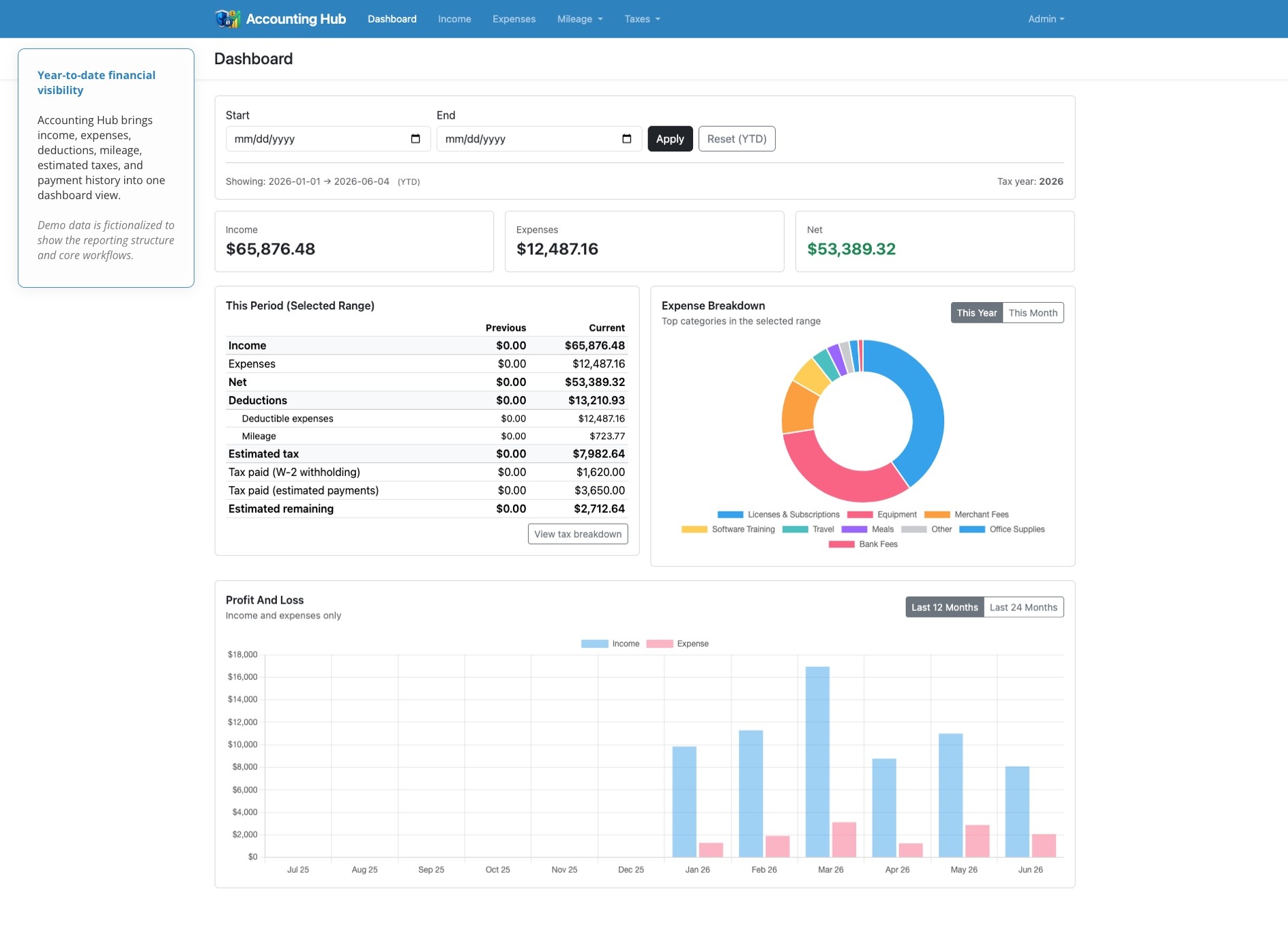
The dashboard serves as the main control center. It summarizes income, expenses, net revenue, deductions, estimated tax, tax paid, and remaining tax obligations. It also visualizes expense categories and profit-and-loss activity over time using Chart.js. The app includes separate areas for income, expenses, mileage, mileage rates, tax breakdowns, estimated tax payments, and profile/security settings.
Rather than trying to become a full accounting platform, Accounting Hub focuses on the specific records and calculations that matter most to my freelance business. The result is a practical internal tool that helps me stay organized before tax season instead of cleaning everything up after the fact.
Platform Architecture
Accounting Hub is built as a traditional server-rendered Laravel application. The interface is handled through Blade views, while Laravel controllers manage requests and Eloquent models handle persistence. Accounting-specific logic is separated into service classes, which keeps the controllers thin and the calculations easier to reason about.
| Area | Implementation |
|---|---|
| Backend framework | Laravel 12 |
| UI rendering | Blade |
| Data layer | Eloquent models and migrations |
| Frontend tooling | Vite |
| Interface styling | Bootstrap |
| Interactivity | Alpine |
| Charts | Chart.js |
| Authentication | Laravel Fortify / Breeze |
| Core logic | Service classes for accounting, mileage, and tax calculations |
Core Data Model
The app is organized around the real financial objects I need to track as a freelancer. Income, expenses, mileage trips, mileage rates, tax payments, activities, and tax profiles each have their own model. Every financial record belongs to a user, and tax-related data is scoped by year.
| Model | Purpose |
|---|---|
IncomeEvent |
Tracks income, source, withholding, invoice links, payment metadata, and tax classification |
ExpenseEvent |
Tracks business expenses, vendors, categories, receipts, deductible status, and notes |
MileageTrip |
Tracks business travel, mileage, activity type, route details, tolls, and parking |
MileageRate |
Stores effective-date mileage rates used for deduction calculations |
TaxPayment |
Records estimated payments by year, jurisdiction, and state |
Activity |
Provides reusable activity categories for business and mileage records |
One of the most important architectural choices was storing money in integer cents rather than floating-point values. That keeps financial calculations more reliable and avoids rounding problems that can happen when currency is handled as decimal floats.
Income and Expense Workflows
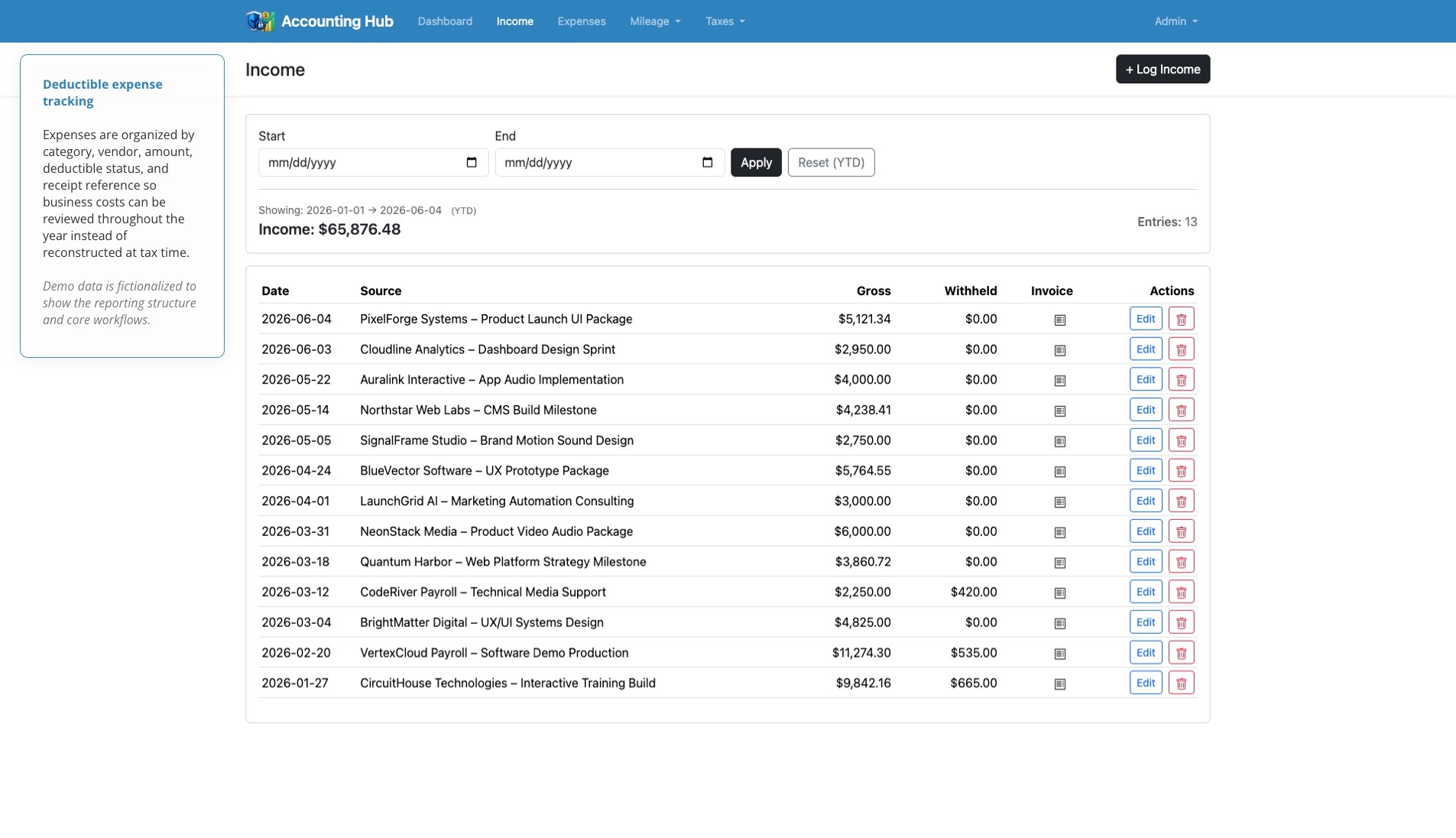
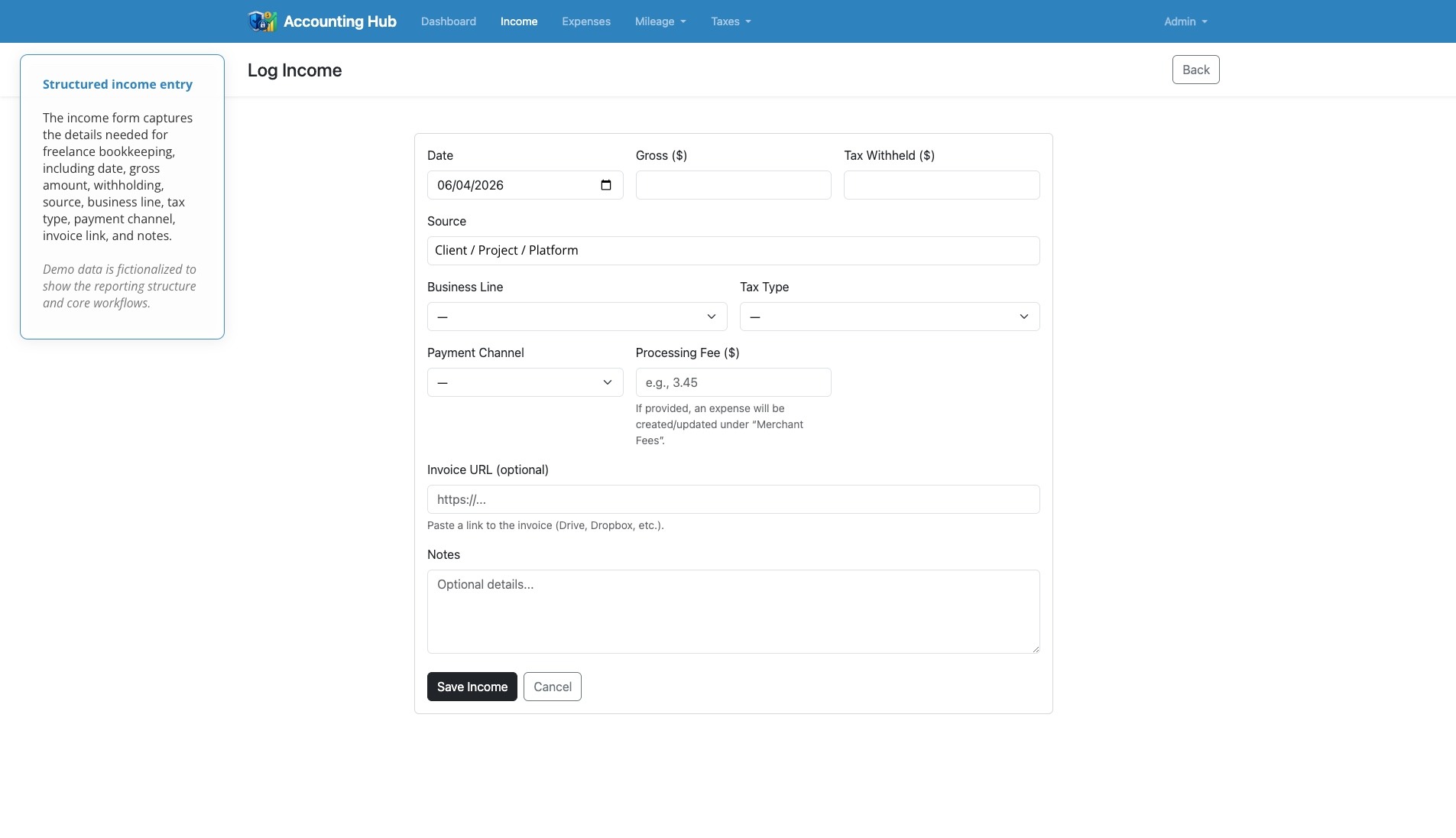
The income system was designed to capture gross payments, withholdings, sources, business lines, tax types, payment channels, invoice URs, and notes. That gives the app enough context to support tax estimates and year-to-date reporting.
A useful detail is how the app handles processing fees. When an income event includes a processor fee, Accounting Hub can automatically create or sync a linked “Merchant Fees” expense. Editing the income entry updates the related fee expense, and deleting the income entry removes the linked expense. This keeps related records connected without forcing the user to manually duplicate the same bookkeeping step.
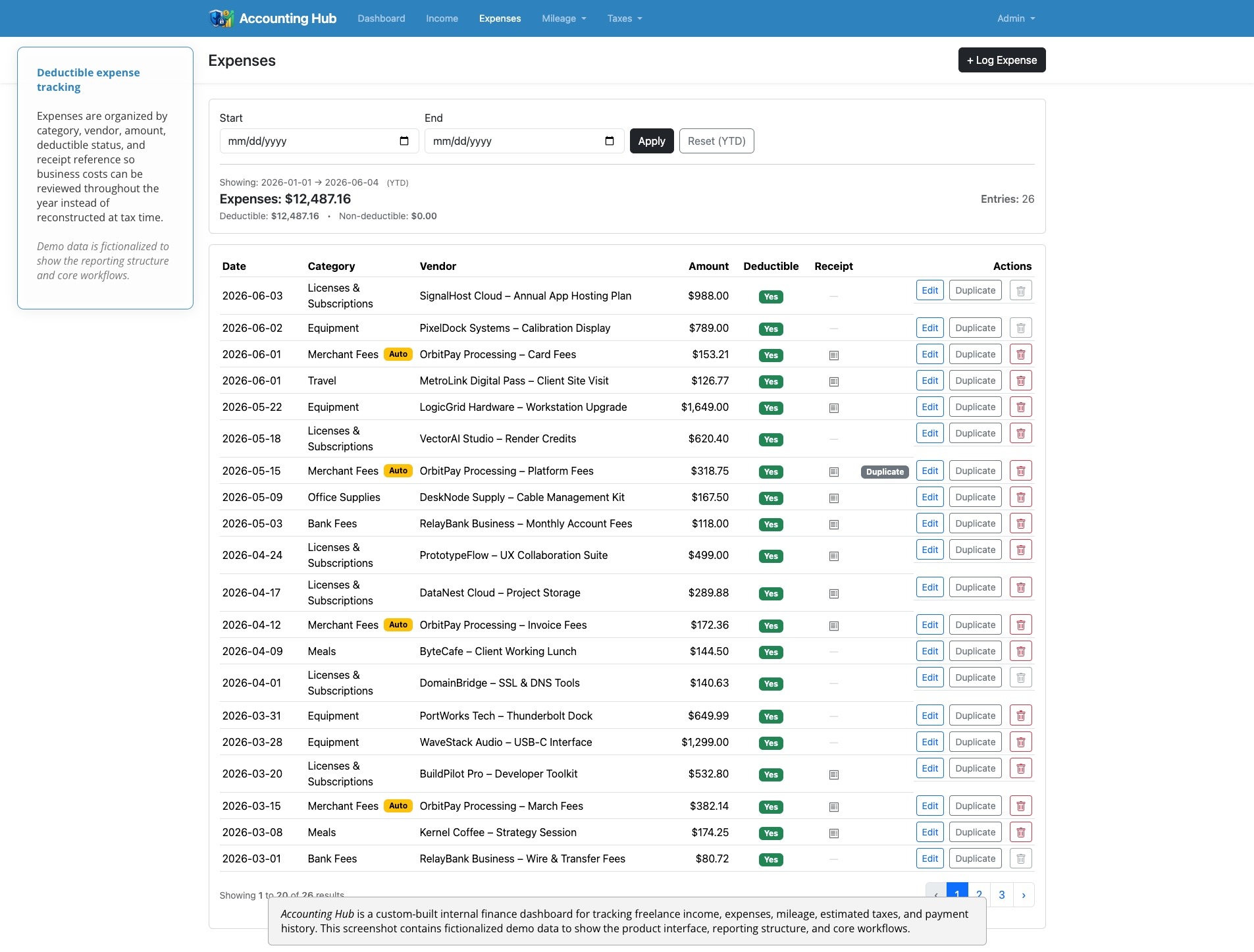
The expense side follows a similar philosophy. Expenses can be categorized, marked as deductible, connected to vendors, assigned to a business line or payment channel, and linked to a receipt. The app also includes duplication tools for recurring expenses and safeguards around expenses that were automatically generated from income records.
Mileage Tracking
Mileage is often easy to forget until it becomes difficult to reconstruct. Accounting Hub treats mileage as a dedicated workflow instead of a side note.
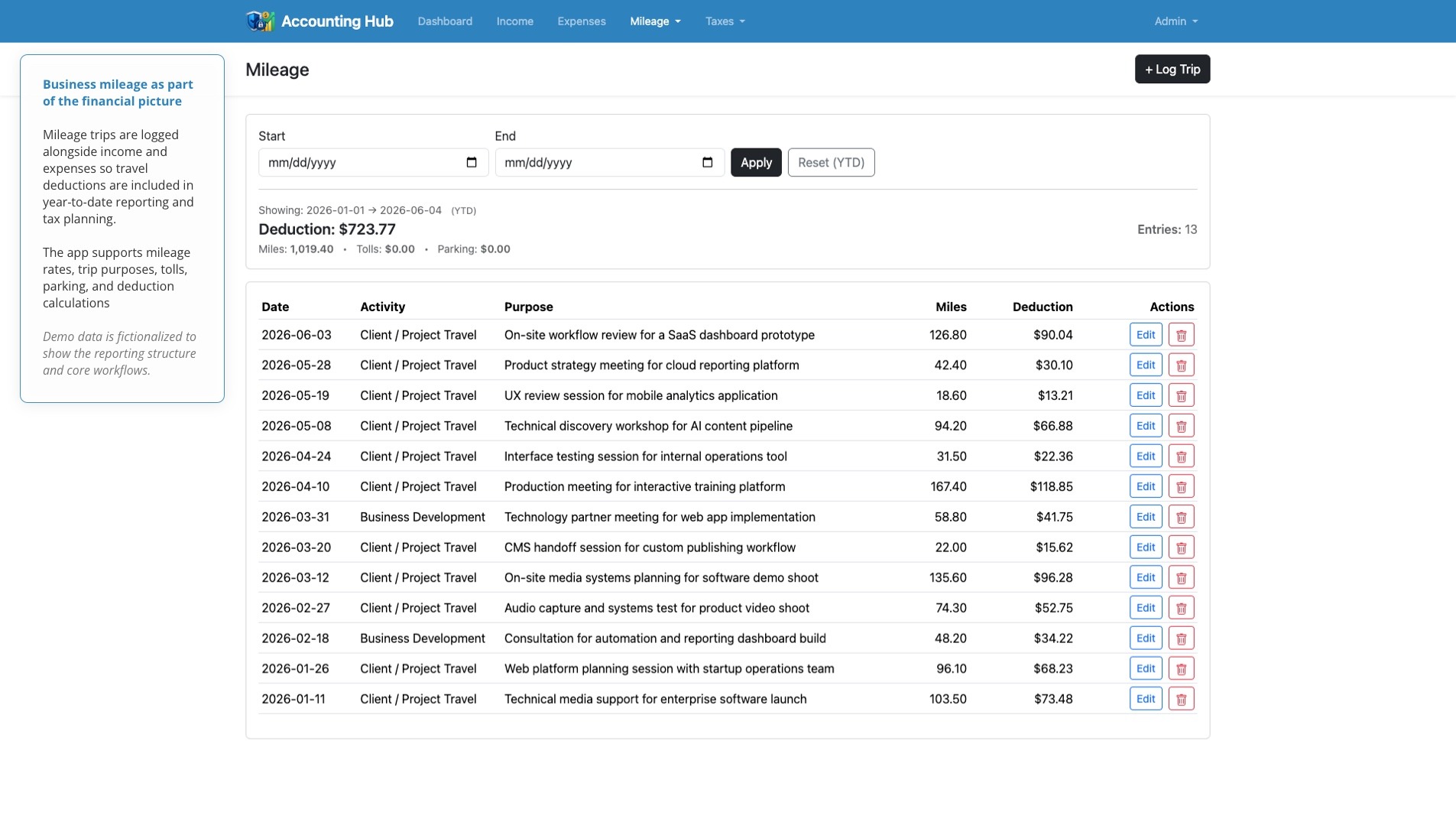
The mileage system supports both manual and odometer-based entry. Trips can be assigned to activities, marked as round trips, and supplemented with tolls or parking. Mileage deductions are calculated using rates that are looked up by effective date, and the app includes a mileage rate management area for maintaining those values over time. There is also a recalculation tool for updating existing trips, including a dry-run mode for previewing changes before committing them.
That makes mileage part of the same financial picture as income and expenses. When I look at the dashboard or tax breakdown, mileage deductions are already included instead of living in a separate spreadsheet.
Tax Planning
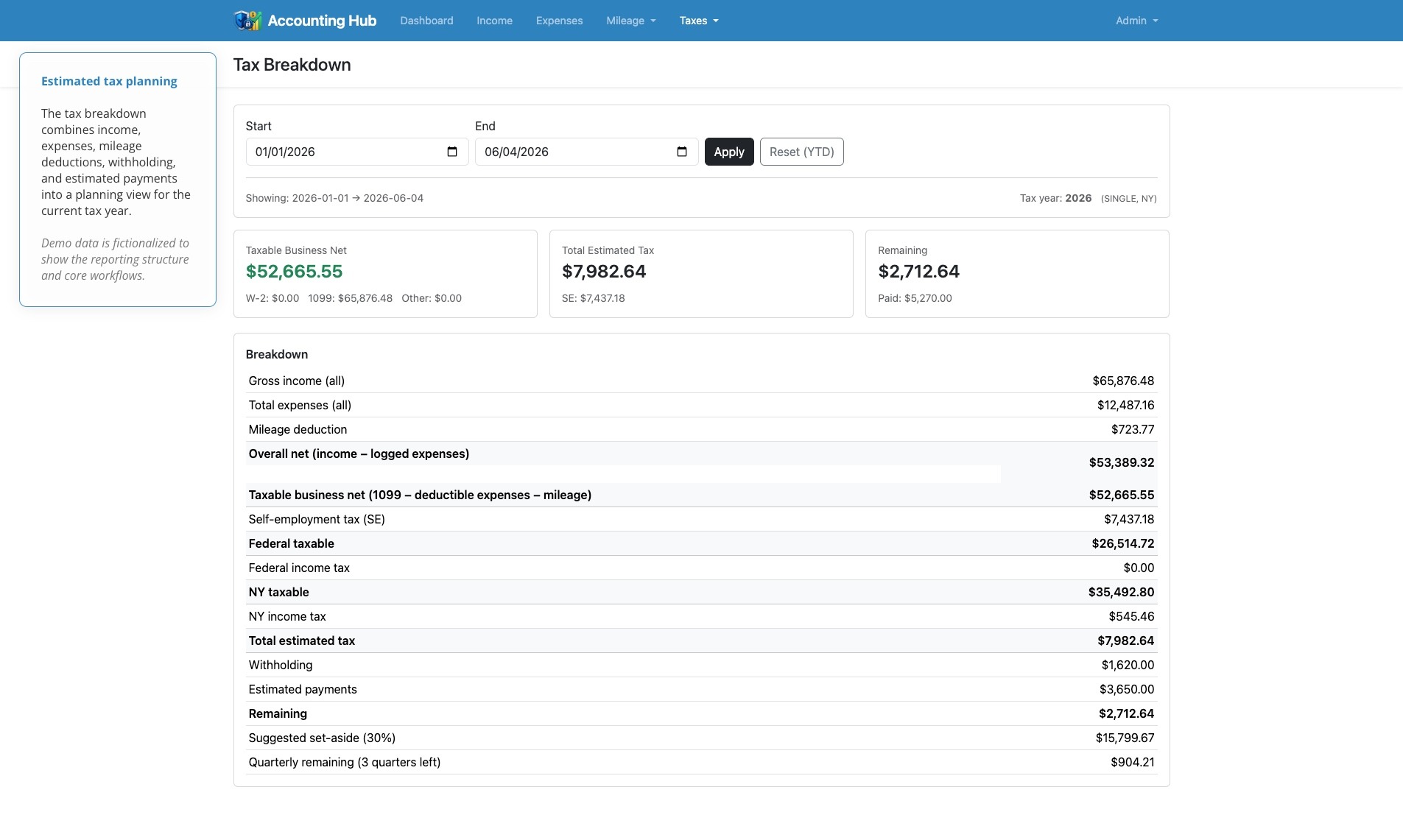
The tax breakdown is the most domain-specific part of the application. It brings together income, expenses, mileage deductions, withholding, estimated payments, and seeded tax data to calculate a planning view of the year.
| Tax Area | What the App Calculates |
|---|---|
| Income | Gross income, self-employed income, W-2 income, and other income |
| Deductions | Deductible expenses and mileage deductions |
| Taxable income | Federal taxable income and state taxable income |
| Estimated tax | Federal, state, and self-employment tax estimates |
| Payments | Withholding and logged estimated payments |
| Planning | Remaining tax and suggested quarterly payment amounts |
The tax logic is handled through a dedicated TaxCalculator service rather than being hardcoded directly into controllers. The app also uses seeded tax profiles, standard deductions, and tax brackets, which makes the tax system more maintainable than embedding all of the rules in request-handling code.
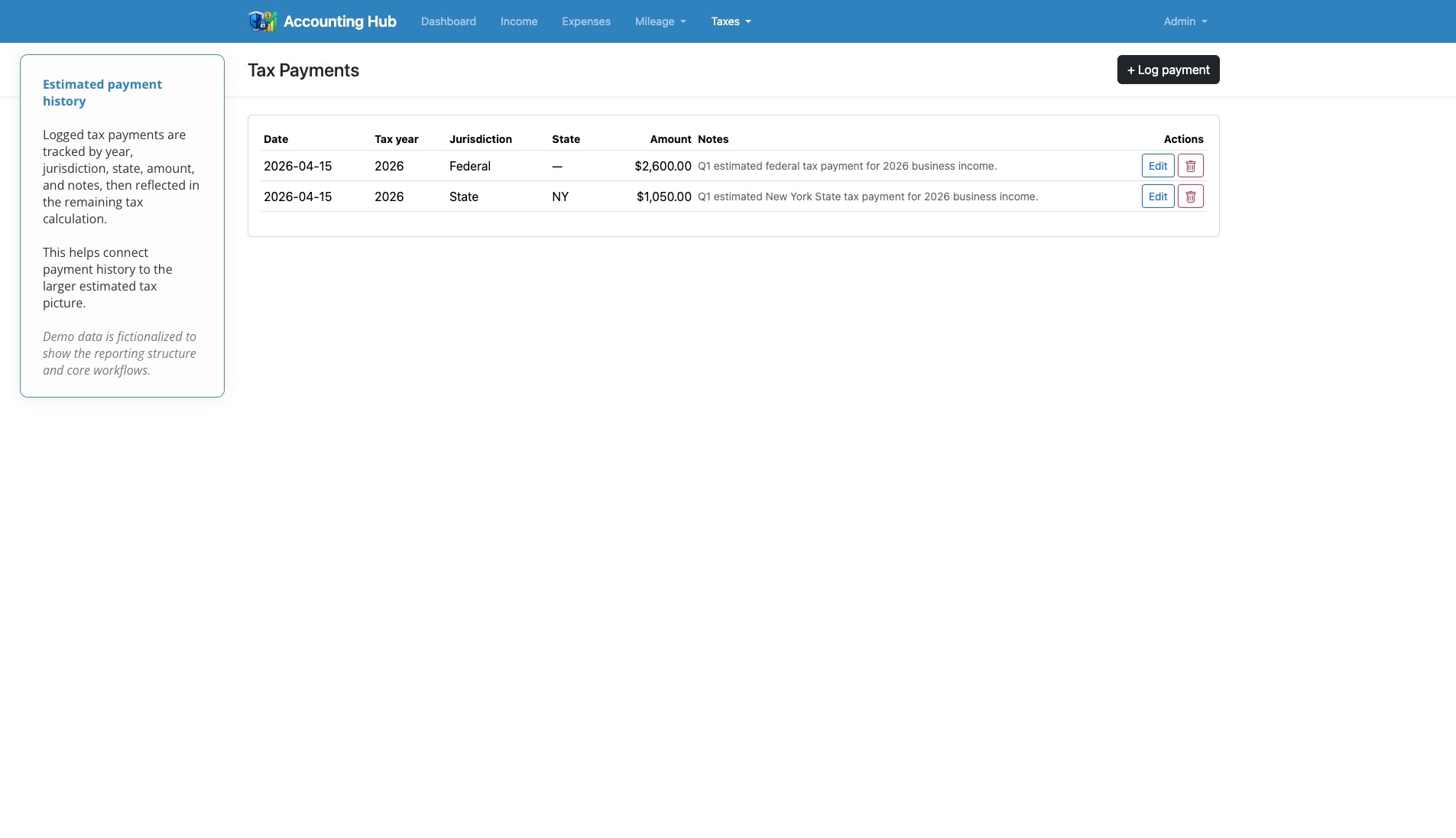
The tax payment section completes the loop by allowing estimated payments to be logged by year and jurisdiction. Those payments are then used in the tax calculator so the app can show not only what may be owed, but what has already been paid.
Service Layer
The app’s calculation logic is separated into a small service layer. This helps keep the code organized and makes the domain logic easier to reuse across the dashboard, tax views, and record screens.
| Service / Support Class | Responsibility |
|---|---|
AccountingTotals |
Aggregates income, expenses, deductions, and summary values |
MileageCalculator |
Calculates mileage deductions from trips and effective rates |
TaxCalculator |
Calculates estimated tax, taxable income, payments, and remaining obligations |
DateWindow |
Standardizes YTD and custom date-range filtering across the app |
This separation gives the application a cleaner structure. Controllers handle requests, services handle calculations, models represent persisted records, and Blade views render the user interface.
Security and Account Management
Because the app stores sensitive financial information, authentication and account management were important from the beginning. The profile and authentication flows include login, logout, registration, password reset, email verification, password confirmation, and two-factor authentication. These features are handled through Laravel Fortify/Breeze and related profile controllers and validation requests.
Interface Design
The design goal was clarity over complexity. Accounting Hub uses a straightforward Bootstrap-based layout with simple navigation, readable tables, compact forms, and dashboard charts where visualization adds value.
The main navigation reflects the app’s core mental model: Dashboard, Income, Expenses, Mileage, Taxes, and Profile. This keeps the interface aligned with the way I actually need to use the app during the year.
The dashboard uses charts sparingly. The expense breakdown helps the user understand where money is going. The profit-and-loss chart shows income and expense movement over time. The rest of the interface stays table-driven and form-driven because the main job of the app is accurate recordkeeping.
Summary
Accounting Hub turned a spreadsheet nightmare and accounting process into a focused internal product. Instead of waiting until tax season to assemble income records, deductible expenses, mileage, and payment history, I can log activity throughout the year and monitor the business from one place.
The project also gave me an opportunity to combine product strategy, full-stack development, interface design, financial logic, data modeling, authentication, and dashboard visualization in a single practical application.
For my portfolio, Accounting Hub represents the kind of product I like building—a real tool shaped by a real operational problem, designed to make complex information easier to manage.
Related Projects

ShotCue AI
2026
Structured AI Video Generation Tool
UX/UI Design, Web Development

Frequency
2026
Phaser Game
Game Development, Producer, Product Design, Sound Design, Visual Design

Factor Commercials
2026
Ernie Clement Campaign
Production Sound

HourWise
2026
Time Tracking & Timesheet App
Product Design, UX/UI Design, Web Development

Moodara
2025
Privacy-First Mood Tracking App
Product Design, UX/UI Design, Web Development

Forum Groningen’s Disney: Telling Timeless Stories
2023
Museum Exhibition
Production Sound, Voiceover
Rebirth
2022
Algorithmic Music
Algorithmic Composition, Music Composition, Sound Design

Microsoft Edge Awareness Campaign
2022
LinkedIn Video and Static Ads
Audio Production, Producer, Sound Design, Visual Design, Voiceover